
ECSC 2026 Participant Handbook
12–16 October 2026, Bochum, Germany
12–16 October 2026, Bochum, Germany
This document is intended to be a comprehensive and self-contained guide for ECSC 2026 participants. The current version is a draft, subject to changes depending on feedback and possible organizational updates.
This document is based on the ECSC documentation including the Charter, the Rules, and the Code of Conduct, and all participants should be familiar with this documentation. Some parts of this document (e.g. communication rules, roles and structure of the document) are based on the Handbook for ECSC 2025 created by NASK - Państwowy Instytut Badawczy.
The European Cybersecurity Challenge (ECSC) is an annual event happening at an international level that brings together the most promising talents in the cybersecurity sector. The competition acts as a unique platform dedicated to sharing knowledge, ideas and skills through practical tests on topics representing the state of the art of cybersecurity. During the event, teams from participating countries compete in a series of Capture-The-Flag format challenges over two days to determine the best prepared nation.
Originating in 2014, the event is coordinated by ENISA, the European Union Agency for Cybersecurity. Each year a different host country is responsible for the organization.
ECSC 2026 takes place in Bochum, Germany, from 12 to 16 October 2026. It is organised by Nachwuchsförderung IT-Sicherheit e.V. (NFITS) with the City of Bochum as host city partner and made possible together with our event partners and sponsors.
The event offers a unique opportunity for participants to interact with other young people from across all of Europe, as well as receive mentorship, broaden their skills and establish lasting connections in the cybersecurity field, benefiting their careers and becoming part of an extremely active community of young cybersecurity talents.
The European Union Agency for Cybersecurity, ENISA, is an institution whose main goal is to achieve a high common level of cybersecurity across Europe. Established in 2004 and strengthened by the EU Cybersecurity Act, ENISA contributes to EU cyber policy, enhances the trustworthiness of ICT products, services and processes with cybersecurity certification schemes, cooperates with Member States and EU bodies, and helps Europe prepare for the cyber challenges of tomorrow. Through knowledge sharing, capacity building and awareness raising, the Agency works to keep Europe’s society and citizens digitally secure.
The Nachwuchsförderung IT-Sicherheit e.V. (NFITS) is a non-profit association whose main goal is to identify and promote young talent in the field of information security across Germany. Established to foster up-and-coming IT professionals, NFITS contributes to national cybersecurity education, enhances practical hacking and defense skills through nationwide competitions like the Cyber Security Challenge Germany, cooperates with government bodies, industry partners, and European institutions, and helps Germany prepare for the cyber challenges of tomorrow. Through knowledge transfer, competitive events, and community building, the Association works to secure society’s digital future by empowering the next generation of cybersecurity experts.
In addition to what you would usually bring, don’t forget
It is hard for us to predict the weather in Bochum in October. Temperatures typically vary between 5 and 20 °C, and rain is possible. You should check a forecast shortly before travel and pack accordingly.
We recommend flying into Frankfurt (FRA) or Düsseldorf (DUS). Cologne/Bonn (CGN) and Dortmund (DTM) are also reasonable, though getting from there to Bochum is a little more complicated.
Bochum is also reachable by train (via Bochum Hbf station), and we generally recommend taking the train from the airport to Bochum. You can check German train schedules at bahn.de.
Frankfurt Airport has a long-distance train station directly at the airport (Frankfurt Flughafen Fernbahnhof).
Normally, there is an hourly direct ICE from Frankfurt Airport to Bochum. Unfortunately, due to the construction work, that connection is only served in the evening, so if you arrive on Monday, you will have to take a different route to Bochum.
Reasonable options include taking the ICE to Gelsenkirchen Hbf and then RB46 to Bochum Hbf, or the ICE to Hagen Hbf and then RB40 to Bochum.
There are multiple connections every hour; it should take about 2.5 hours to get from FRA to Bochum.
Düsseldorf Airport also has a long-distance train station. Because the construction work is on the line from Düsseldorf to Duisburg, service at that station will be severely limited.
Instead, make your way to the S-Bahn (local transportation) stop “Düsseldorf Flughafen Terminal” below the terminal. This means not taking the SkyTrain that would normally take you to the long-distance trains.
From there, take S11 to Düsseldorf-Derendorf, S6 to Essen Hbf, and finally any one of RE6/RB40/S1 to Bochum Hbf. This takes about an hour; trains run every 30 minutes.
Getting from CGN to Bochum is somewhat more involved than from the prior two airports. You will want to check bahn.de or vrr.de for details.
Generally, you will take, e.g., S19 or RE6 to Köln Hbf (or Köln Messe/Deutz) and change into an ICE (or RE7) to Gelsenkirchen or Hagen, then proceed as from FRA.
At the time of writing, bahn.de offers three connections per hour, at about two hours of travel time.
Check vrr.de for options from Dortmund Airport. Generally, this involves first getting to Dortmund main station (via bus 490 and then subway U47, via a direct shuttle bus, or via the shuttle bus to Holzwickede station and RB59).
Shuttle bus tickets can only be bought offline.
From Dortmund Hbf, regional trains run to Bochum Hbf multiple times per hour. The total travel time is about 75 minutes.
Bochum is located on the A40 and A43 highways and generally easily reachable by car or coach. You can find the addresses for the venues in Venues.
There are a few things you should know about booking train tickets in Germany:
You can buy tickets online (at bahn.de), or through the DB Navigator app.
If your train is cancelled or delayed, here are a few additional things you should know:
Public transport in Bochum is reliable and safe.
Buses and trams typically run until shortly after midnight during the week; on Friday and Saturday evenings, there are additional hourly night services (NE bus lines).
Public transport in Bochum is run by BOGESTRA. You can buy tickets on their website, in their “Mutti” app, or on-site in Bochum. Alternatively, you can use the app or website of the regional transport association VRR. DB Navigator and bahn.de also show current connections, as does the open-source Offi app.
You can also reach police directly at 110, but the 112 emergency dispatcher will forward you to police or other appropriate services; 112 should be your first call. Mobile phones should translate other emergency numbers (e.g., 999) to 112 automatically. Calling emergency numbers in Germany requires a valid SIM card, but this does not have to be German (your SIM card from home is sufficient).
For urgent but non-emergency medical assistance, call 116117 (“Ärztlicher Bereitschaftsdienst”).
To handle smaller injuries (e.g., cuts) or medical issues during the event, we will have medically trained staff on site.
An overview of the important locations for this year’s ECSC can be found in this interactive map.
The opening ceremony on Monday and the CTF events on Tuesday through Thursday as well as the final Steering Committee meeting on Friday will take place in RuhrCongress Bochum.
To get to RuhrCongress by public transportation, take bus 354 to RuhrCongress, or tram lines 308, 316, or 318 to Planetarium or Vonovia RuhrStadion.
An on-site paid parking garage is available.
The room plans in the sections below are preliminary and subject to change.
The opening ceremony and the CTF events will take place in the Great Hall (Großer Saal) of RuhrCongress Bochum. You can enter the Great Hall by turning left in the foyer.
The player area outside of the Great Hall is reserved for players during the CTF, and includes a break area for players wishing to take a break during the CTF.
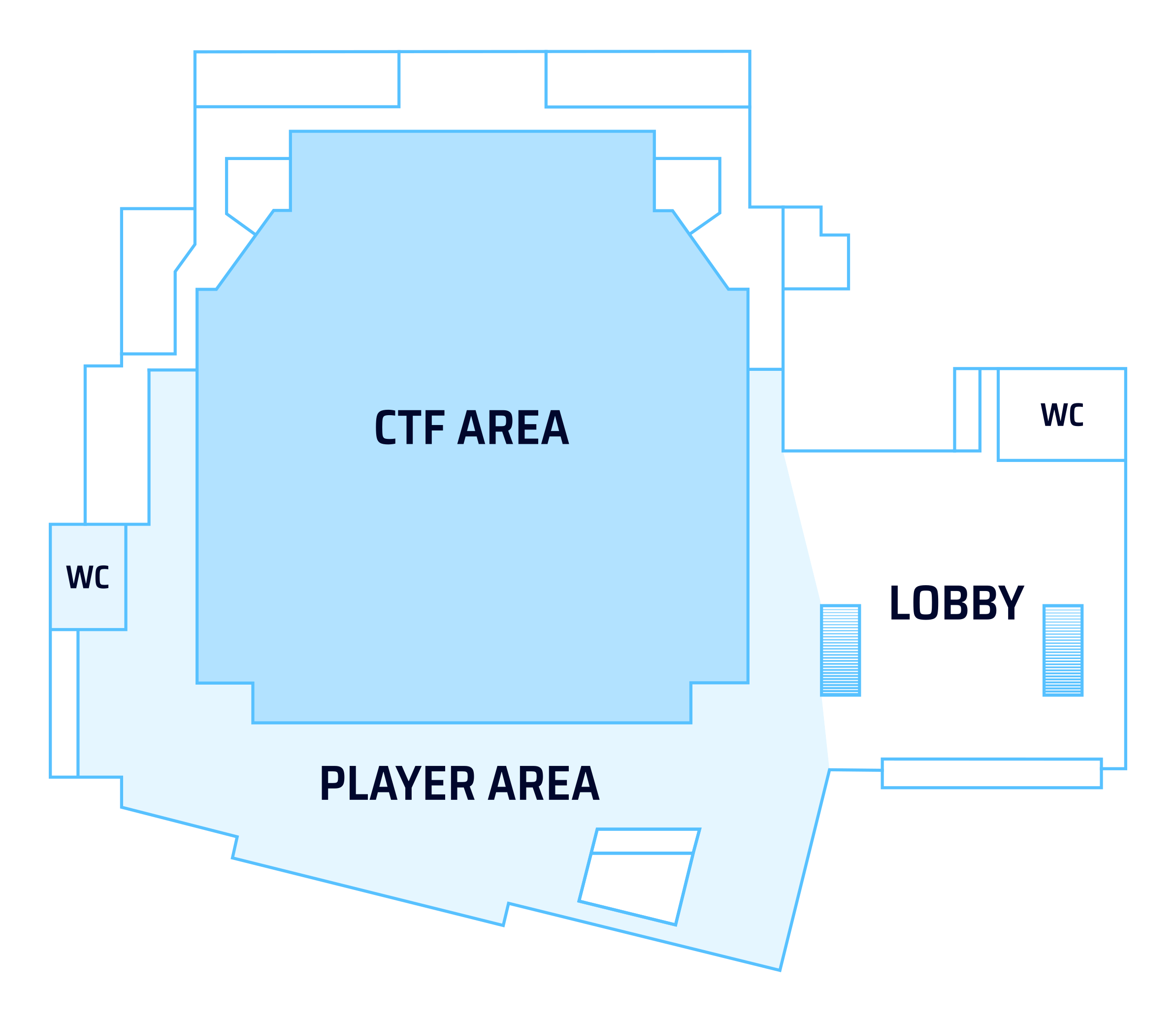
Delegations and other guests are generally not allowed to enter the playing area during the CTF events. Instead, we have reserved the Congress Saal on the top floor of RuhrCongress Bochum for you. Two sets of stairs lead from the foyer to the upstairs delegation area.
Steering Committee meetings and press work take place in the meeting rooms opposite the delegation room.
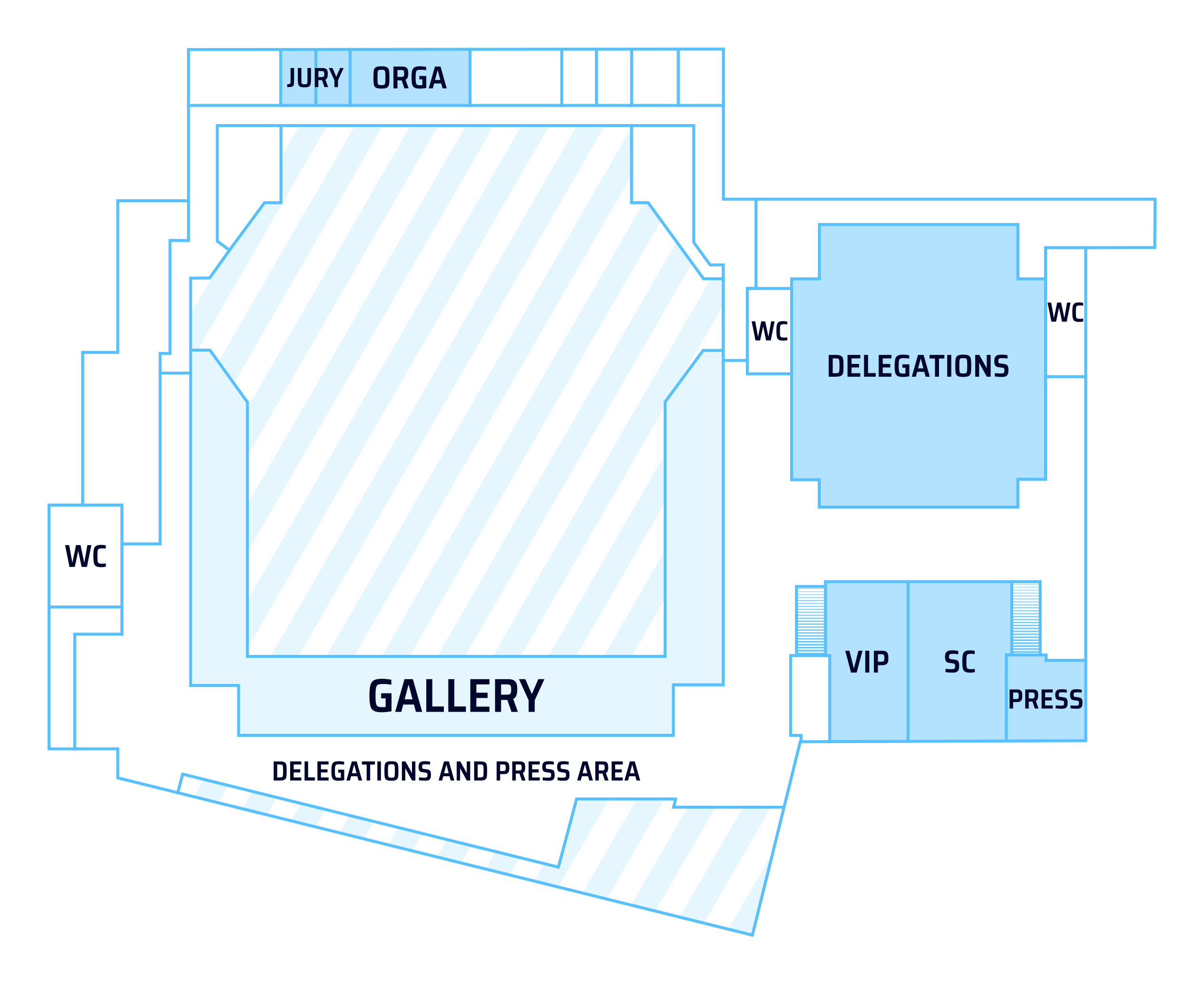
Some areas of the venue are reserved for the organizing team and the jury. The backstage and delivery area downstairs is generally off-limits to visitors.
For those who need it, we try to offer a quiet space backstage. Please approach an angel or watchdog for more information.
Venue and catering staff and the organizing team have access to all areas at all times.
Accessible toilets are located in the basement; an elevator is available.
We don’t allow team or sponsor banners and flags to be displayed permanently at the team tables, as they could be mistaken for official ECSC sponsorship. Branded personal items such as team shirts, hoodies and laptop stickers are fine. You’re also welcome to use a banner or flag for team photos, as long as it isn’t left on display.
The closing ceremony and afterparty on Friday will take place in the Jahrhunderthalle Bochum.
To get to Jahrhunderthalle by public transportation, take tram lines 302, 305, or 310 to either Jacob-Mayer-Straße/Jahrhunderthalle or Bochumer Verein/Jahrhunderthalle.
Persons with reduced mobility may want to consider taking tram 302 to Westpark, which avoids the incline from Alleestraße to Jahrhunderthalle.
You can also find a paid parking garage nearby.
In case of emergency, make sure you know where your hotel is. If you booked your hotel through the shared booking portal, here is a list of addresses:
| Hotel | Address | Near to |
|---|---|---|
| Moxy Bochum | Stadionring 18, 44791 Bochum | RuhrCongress, Starlight Express |
| Best Western Hotel Bochum | Stadionring 22, 44791 Bochum | RuhrCongress, Starlight Express |
| Garner Hotel Bochum | Nordring 44-50, 44787 Bochum | Bergbaumuseum |
| B&B Hotel Bochum Hbf Nord | Kurt-Schumacher-Platz 13-15, 44787 Bochum | Bochum Hbf (central station) |
| B&B Hotel Bochum Hbf Süd | Universitätsstraße 3, 44789 Bochum | Bochum Hbf (central station) |
| B&B Hotel Bochum City | Alleestraße 30-32, 44793 Bochum | Bochum West station |
| Achat Hotel Bochum Dortmund | Kohlleppelsweg 45, 44791 Bochum | Ruhr Park shopping mall |
All times are in CEST (UTC+2, Bochum local time during the event).
There will be additional optional side events open for participants and guests of ECSC 2026. These may require a separate registration and will be announced outside of this handbook.
You will always find the most up-to-date schedule on the official ECSC 2026 website at ecsc2026.de.
| 13:00 – 15:45 | Team registration | RuhrCongress Bochum – Foyer |
|---|---|---|
| 16:00 – 18:30 | Opening ceremony | RuhrCongress Bochum – Great Hall |
| 18:30 – | Dinner and networking | RuhrCongress Bochum – Player and delegation areas |
| 09:00 – 10:00 | Setup and testing | RuhrCongress Bochum – CTF area (Great Hall) |
|---|---|---|
| 10:00 – 22:00 | Jeopardy CTF | RuhrCongress Bochum – CTF area (Great Hall) |
| 10:00 – 12:00 | Attack-Defense testing (optional) | RuhrCongress Bochum – CTF area (Great Hall) |
|---|---|---|
| 12:00 – 13:00 | Lunch | RuhrCongress Bochum – Player and delegation areas |
| 13:00 – 18:00 | CTF-Unplugged and networking | RuhrCongress Bochum – CTF area (Great Hall) |
| 18:00 – 19:00 | Dinner and networking | RuhrCongress Bochum – Player and delegation areas |
| 19:00 – 21:00 | CTF-Unplugged and networking | RuhrCongress Bochum – CTF area (Great Hall) |
| 10:00 – 11:00 | Setup and testing | RuhrCongress Bochum – CTF area (Great Hall) |
|---|---|---|
| 11:00 – 19:00 | Attack-Defense CTF | RuhrCongress Bochum – CTF area (Great Hall) |
| 19:00 – | Dinner and networking | RuhrCongress Bochum – Player and delegation areas |
| 10:00 – 12:00 | Steering Committee Hotwash Meeting | RuhrCongress Bochum – Steering Committee room |
|---|---|---|
| 14:00 – 15:00 | Arrival | Jahrhunderthalle Bochum |
| 15:00 – 18:00 | Closing Ceremony | Jahrhunderthalle Bochum |
| 18:00 – 20:00 | Dinner | Jahrhunderthalle Bochum |
| 20:00 – 02:00 | Afterparty | Jahrhunderthalle Bochum |
Every person that is present at the event will wear a badge that describes their role(s).
The Steering Committee consists of representatives from the countries participating in the ECSC competition. It is the governing body of ECSC, ensuring the organization fulfills its mission and achieves its objectives. The Steering Committee oversees ECSC’s operations, sets policies, makes major decisions, and is legally responsible for ECSC’s activities. It establishes standing committees (such as the Executive Committee) to address specific issues.
The Executive Committee is established on behalf of the Steering Committee. The Steering Committee provides guidance and oversight to ECSC’s Executive Board. Its responsibilities include setting the overall strategic direction of the organization, establishing policies and procedures, monitoring organizational performance, ensuring financial sustainability, accountability, transparency, and communicating with stakeholders. Together, the Steering Committee and Executive Board work to ensure the organization’s success.
Jury members are responsible for impartially resolving disputes and maintaining fairness in the competition. The jury is a small body (3–5 people) with high experience and diverse skill sets.
The main responsibilities of the jury include:
Watchdogs are expected to monitor the correct development of the competition in accordance with the rules, and any jury or Steering Committee decisions. They are the primary point of contact for players during the competition (in addition to the ticketing system) in case of complaints and/or questions about the rules. Watchdogs report their observations to watchdog managers, who act as a direct interface with the jury and organizers to handle non-trivial situations.
Angels are non-technical collaborators needed to ensure a smooth event. They mainly handle logistical aspects such as registration, access control, and food and beverage administration.
Watchdogs are selected by a public call among CTF players, students, and former ECSC players with past experience in CTFs or large event management.
Organizers and technical staff serve as the core team responsible for running the event.
Organizers are in charge of venue logistics, which includes setting up several areas, coordinating catering, and managing the event schedule.
Technical staff oversee the competition infrastructure, including the creation and development of challenges, testing and deployment, as well as the overall format, rules, and organization of the competition.
During the event, they address the competition-related tickets from participants and assist the jury by providing all necessary technical materials for their investigations. Additionally, they manage communication with players and moderate the Discord server.
A team is the entire set of people representing one of the countries playing in the ECSC. The core of a team are the team’s players, which are the ones who actively play the competition games in the game arena, at the team’s table.
Each team has at least one coach. The coaches do not take part in the competition challenges and there is no limitation on their age. The coaches are responsible for the well-being and behavior of their players.
The coaches should ensure that essential information coming from or intended for the team players is communicated, understood, and acted upon.
The coaches are physically separated from the team players during the competition.
Among its players, each team nominates a captain, who is the point of contact for the team.
Media accreditation is required for every person producing photos, video, audio, interviews or written coverage for public release. This includes reporting for a news organisation, team, sponsor, partner, social media channel, or any other organisation. It also covers material intended for any public social media post. Each person must apply separately at ecsc2026.de/press. Submitting the form does not grant access. The ECSC 2026 Communications Team confirms accreditation.
Recordings that remain strictly private and non-public do not require accreditation. If you intend to publish the material, you must apply for accreditation. Consent, screen protection, access and non-disruption rules apply in either case. Official event coverage is carried out by the organisers or commissioned crews and is subject to internal rules.
During active competition, media may not enter the competition area, unless explicitly approved by the Communications Team and accompanied by a press angel and a watchdog. Recordings are permitted only from outside that area or from a position expressly approved by the Communications Team. Screens, notes, challenge material and other sensitive competition information must not be identifiable. Coverage must not distract participants or disrupt the event.
Do not photograph, film or record anyone visibly marked as having opted out. You can identify players and other guests that have opted out of photography by their yellow lanyard (the default lanyard is black). Accreditation does not replace consent or any other right needed to record or publish material. The person creating the coverage and their organisation must obtain all necessary permissions, including permissions involving minors.
During active competition, participant interviews may take place only outside the competition area. They require the participant’s consent, coach approval, organizers’ approval, an assigned press angel and a watchdog. The watchdog or press angel must understand the interview language well enough to monitor the situation. Media must contact the Communications Team in advance so that it can start and coordinate this process. Outside active competition periods, interviews require the interviewee’s consent. Advance coordination with the Communications Team is strongly recommended.
Indoor drone use is prohibited. Outdoor operators must comply with the law, local rules, venue restrictions and all required permissions. Operation remains the operator’s responsibility.
Official photography, video recording and livestream coverage will take place during ECSC 2026. Full media rules and accreditation information are available at ecsc2026.de/media. For any questions, please reach out to the ECSC 2026 Communications Team at media@ecsc2026.de.
| Color | Hex | Role |
|---|---|---|
| #AE0DFA | Steering Committee/ENISA | |
| #F90293 | Jury | |
| #CA0121 | Watchdog | |
| #99F8FB | Angel | |
| #F95702 | Organizer | |
| #F7A40C | Technical Staff/Challenge Author | |
| #3FF81B | Player/Captain | |
| #016CFA | Coach | |
| #FAF704 | Press | |
| #D3A55A | VIP | |
| #DBD9DA | Guest/Delegation |
The event features three separate competition days played on-site. The first competition day (Tuesday) is a Jeopardy-style CTF competition. On Wednesday, there will be a new format: CTF-Unplugged. It is not included in the main score. The final competition day (Thursday) contains the Attack/Defense CTF competition.
The CTF infrastructure will be hosted in the cloud. The participants will connect to the cloud using infrastructure prepared by the organizers on-premises.
Each team has its own table in the game arena. Each table has a switch, which has at least 12 Ethernet ports available (i.e., excluding ports already used by the organizers). Each table has at least 12 power sockets available (“Schuko” / Type F) for a total of at least 3.5 kW power capacity per table. Some of that power will be used for other hardware (e.g., the switch); expect there to be roughly 3 kW available for players.
Team tables may include additional hardware or network devices provided by the organizers for challenges or infrastructural support. This equipment, sourced from the venue, sponsors, or the organizers themselves, must be left on the table at the end of the competition, unless otherwise specified.
Teams can connect to the Internet through Ethernet cables to their switches. Players are expected to bring their own computer, ethernet cables (and adapters, if required). The wired infrastructure has a dedicated uplink of 9 Gbps. Teams have 1 Gbps access to the network per table, but keep in mind that the overall capacity can vary depending on the type of traffic and the routes used, making it difficult to provide an exact estimate. Players must avoid generating excessive traffic; team-specific rate limits can be imposed to limit infrastructure disruptions.
There will be a backup over Wi-Fi.
Day 2 of ECSC 2026 (Tuesday, October 13, 2026) is the Jeopardy competition.
While the competition will follow a typical, modern jeopardy-style CTF with dynamic scoring, the following subsections explore certain aspects of the competition in more detail.
We strongly encourage players, captains, and coaches to carefully read the sections below, but also to familiarize themselves with other jeopardy-style CTF competitions to better understand this format.
The Jeopardy competition lasts 12 hours. Writeups can be submitted during and up to 10 minutes after the competition.
| Time (CEST) | Event |
|---|---|
| 9:00 | Setup and testing |
| 10:00 | Jeopardy competition starts. Challenges become accessible, flags and writeups can be submitted. |
| 22:00 | Jeopardy competition ends. |
| 22:10 | Writeup submission deadline. |
In case of unforeseen circumstances the schedule can be altered. In such a case, the organizers will inform all teams. Where it would affect the competition length, the exact details of any possible schedule change will be decided by the Jury.
The approximate number of challenges for the Jeopardy competition will be announced later on. A challenge is considered solved when a player successfully acquires a flag and submits it on the Jeopardy Platform during the competition without breaking any rules.
Unless a challenge’s description states otherwise, the flag format matches the following regular expression: ^ECSC\{.*\}$
Additionally, players are required to upload a writeup for each solved challenge before the writeup submission deadline. A working solver script or exploit is considered a writeup equivalent (must be delivered in a form that can be easily analyzed if needed). Writeups can be minimal (e.g. a copy of the solve script). The purpose is solely to be able to see how the challenge was solved. In some cases, the team handing in the writeup may be asked follow-up questions.
A set of challenges will be published at the beginning of the CTF. Additional challenges will be published during the CTF when the number of unsolved challenges in a category gets low or after some time has passed without a release in the category. The decision will be made by the organizers of the jeopardy CTF in accordance with the mentioned criteria. Some prepared challenges might not be released.
There will be no challenges published after 20:00.
If, during the competition, a challenge is found to have issues, one of the following actions will be taken:
Given the above, it is possible for the competition to effectively end with fewer or more challenges than initially announced.
While unlikely, challenge hints may be released during the competition. The Jury will make the final decision on whether a hint is issued and on its exact wording.
No special network setup will be required. There are, however, other network considerations to discuss.
Most importantly, both the Jeopardy platform and all Jeopardy CTF challenges will only be accessible from the local competition network (ethernet link). This means that challenges with server-side components will not accept inbound connections from hosts external to the local competition network unless otherwise specified.
At the same time, selected challenges with server-side components will have internet access and will be able to connect to external hosts. As is typical for CTF competitions, at times players can be expected to operate external servers, be able to set up external domains (DNS), be able to acquire HTTPS certificates, and take similar actions. It may be possible or required to access open ports on your own laptop from a challenge. Whether or not a challenge has internet access will be visible on the platform.
Day 3 of ECSC 2026 (Wednesday, October 14, 2026) is not part of the main competition. It will host a smaller experimental game mode: CTF-Unplugged. It will feature a more race-focused style with a separate scoreboard and prize pool. Exact details will follow as soon as the format designs are finalized.
CTF Unplugged will be a multi-round competition. Teams will compete to solve challenges the fastest, in an offline environment on organiser provided laptops. This event does not influence the final winners of ECSC, but will instead have it’s own scoreboard and own mention at the awards ceremony. This competition will focus on the ability to solve complex cybersecurity related challenges in a constrained environment, under time pressure.
Note: This is the first time this format is being run, rules are subject to clarification or change in the coming weeks. Some exact numbers are still under discussion based on venue constraints and similar, and will be clarified closer to the event.
There will be 4 qualifying rounds, one for each of Reversing, Pwn, Crypto and Web.
Based on the scores from the four qualifying rounds, a top cut of teams will qualify onwards to the Semi Final
Based on overall scores from qualifiers combined with Semi Finals (with higher weighting to semi-final scores), the top [X] teams will qualify for the final.
The Attack-Defense CTF will take place on October 15, starting at 10:00 with a one-hour setup and testing slot. The CTF itself will start at 11:00 and last for 8 hours, until 19:00.
Attack-Defense CTFs are a type of cybersecurity competition in which participating teams host services and attempt to exploit each other over a shared, private network. The goal of the game is to earn points by stealing secrets stored in your opponents’ service instances, and to avoid losing points by preventing your own secrets from being stolen and submitted, all the while keeping the services available and functioning. The team with the most points by the end wins.
The schedule for the day of the Attack-Defense CTF:
| Time (CEST) | Event |
|---|---|
| 10:00 | Setup Testing Slot starts |
| 11:00 | The Attack-Defense CTF officially begins |
| 12:00 | Network opens and teams can communicate with other vulnboxes |
| 18:00 | Scoreboard freeze |
| 19:00 | The Attack-Defense CTF officially ends |
Each team is given root access to one cloud-hosted Linux-based virtual machine that exposes vulnerable services to other teams over a private virtual network.
Over the course of every round, lasting 60 seconds, so-called checkers store text snippets called flags in the services on each team’s vulnbox and test their functionality to make sure they are working as intended. Extracting these flags from other teams’ services and submitting them to a central flag submission service each round to earn ATK-points is the primary goal of the game.
To incentivize teams to keep their services available to other teams to exploit, a series of checks is performed each round against every service of every team by the organizers’ checkers. These tests define the so-called Service-Level Agreement (SLA): the functionality required for a team to earn SLA-points each round.
Each round a team receives DEF-points for every service. The number of points earned is highest when the service is unexploited and decreases with the number of other teams exploiting it.
These points combine to calculate the team score using the scoring formula (see section 7.2).
Each team is composed of a maximum of ten and a minimum of five players. Each participant must belong to one of the following groups:
People who do not fall within this age range are not allowed to participate in the ECSC 2026. Each team can contain up to five senior players; no limitations exist on the number of junior participants.
Reserve players and player substitutions are not allowed.
As in previous years, ECSC will use the Discord chat platform. Most communication on the competition days is expected to take place on the designated Discord server.
The Discord server setup, the authentication, and the ticketing system are outlined in section 9 of this document.
Please note that this Handbook is published prior to the competition. As such, changes may still be introduced.
To use the Discord platform, it is required to have or create a Discord account. The platform can be accessed using one of the following methods:
Important documents:
Effective communication between players, coaches and the organization is crucial for the smooth functioning of the competition and the overall event. To ensure clarity and efficiency, it is essential to distinguish between three main communication categories:
For all competition-related communications, teams can always choose between one of the following options:
For all event-related communications, people can always choose between one of the following options:
#captain-coaches-comms), explaining what they need (e.g., they would like some more snacks).In emergencies, people should always feel free to communicate any serious issue in whatever way may work best for them. Some examples could be:
Generally, follow the communication guidelines described in the Technical and Human Behavior section (see 6.7).
Be nice to each other. ECSC is a competitive event, but also an opportunity for teams to learn from each other and have fun. Players should help foster that environment.
It is vital that everyone enjoys the event and leaves with a satisfying experience. Therefore, in addition to anything ruled out by law (and common sense), the following are disallowed, up to the penalty of a ban from the event and venue:
Any unfair behavior with respect to the competition or the other players is forbidden, even if not explicitly described in the rules above; the organizers, the jury and any other relevant authority reserve the right to evaluate each case independently.
When in doubt, please ask (file a Discord ticket).
If you encounter any infrastructure or platform issues, please report them via a ticket on the Discord server and refrain from disclosing them publicly.
The organizers may disclose any vulnerabilities (including 0-days) used during the competition to the relevant upstream vendor, but they will use their best effort to credit the original finder and coordinate the disclosure process.
Please note that various activities, including Discord messages across all channels, competition network traffic, Jeopardy platform usage, and entire Attack-Defense network traffic are recorded and logged. It will be accessed in case of a suspected rule violation.
Any data we record will be deleted within 30 days after the conclusion of ECSC 2026, except for data fragments that may need to be retained for ongoing investigations, if any. Such data will be removed when no longer needed.
Every challenge will be solvable using only open source or freely available software. Participants are free to use any software tool they want, including commercial ones, but the organizers will try to ensure they will not give any significant advantage to discourage their use.
Players are allowed to bring a basic hardware setup: one laptop each, mice, keyboards, power/ethernet/data cables, adapters, external drives, phones, headphones/headsets. The team is allowed to bring up to:
No power extenders are allowed except for the ones provided by the organizers.
Cloud resources are not considered “hardware equipment”; therefore, there is no limitation on them. If something is not mentioned in the list above, then teams must request it. This applies to electronics as well as bulky objects that may impede or annoy other teams in the arena. If teams are unsure about something, they should formally request permission in advance.
Each team is required to bring their own ethernet cables to connect their devices to the access switch they have on their table. Teams must also make sure they have all the adapters they need (e.g., in case no ethernet port is present on a laptop).
Each team is required to bring all the power adapters they need. Each table has at least 12 sockets available (type F compatible).
The hardware equipment necessary to solve the hardware challenges is provided by the organizers; players are not allowed to use any additional tool to solve the hardware challenges apart from their laptops and phones or tablets.
Additional equipment must be submitted in advance for approval by the organizers and venue staff.
In case of players’ hardware failure, teams can request to substitute a device. The request must be reported to a watchdog and will then be raised to the jury. If the request is accepted, the team coaches can bring a new device to the players and bring the old device outside of the arena.
Individuals or teams breaking one or more rules can receive a warning or a penalty, depending on the seriousness of the situation. Possible penalties apply to rule infringements both during the final event (from the time a team arrives until they depart) and online, at any time.
Penalties will be decided by the jury in the form of:
Usage of LLMs is restricted during the competition. The following section describes which kind of LLM usage is allowed and which is prohibited.
Sometimes it is not clear when a service uses an LLM or it is not easy to turn it off. We still want to provide as much freedom as possible so for there spirit of the competition here is a non exhaustive list of things where we have a clear stance:
What is prohibited:
What is allowed for its intended purpose only:
If you are unsure whether a service you want to use is allowed or prohibited, you can always ask the organizers!
As an enforcement measure for the LLM ban we aim to create screen recordings during the Jeopardy and A/D CTF competitions. Participants should therefore take care to not expose any private information during the competitions and prepare accordingly. Details about the concrete implementation will follow later on.
Screen recordings will be accessible only to a strictly limited group of people (consisting of the jury and selected members of the watchdog and core organization team) and will be handled with utmost care.
All screen recordings will be kept onsite and will not be uploaded anywhere.
The Jeopardy competition will use dynamic scoring. Each challenge is worth 1000 points at the beginning of the competition, regardless of category or difficulty. A challenge’s value decreases to 100 points as more teams solve the challenge, according to the following formula:
Here,
so the final formula is as given by the following Python function:
def score(solves: int, teams: int, minimum_points: int = 100, maximum_points: int = 1000, alpha: float = 0.705): decay = (max(0, solves - 1) / max(1, teams - 1)) ** alpha return math.ceil(maximum_points * (minimum_points / maximum_points) ** decay)The total number of points of each team is the sum of the points across all challenges solved by that team at the end of the competition. Specifically, it is not the sum of points the challenge had at the time of the solve. Each team receives exactly the same amount of points for a given challenge.
Example point values with 42 participating teams:
| Challenge solve count | Points |
|---|---|
| 0 | 1000 |
| 1 | 1000 |
| 2 | 846 |
| 5 | 640 |
| 10 | 454 |
| 15 | 340 |
| 25 | 207 |
| 35 | 133 |
| 40 | 109 |
| 42 | 100 |
“First bloods” (the first solve of a challenge) will be recognized and celebrated, but will not award additional points beyond eternal glory.
For the Attack-Defense scoring formula, please refer to the Attack-Defense wiki at https://wiki.ad.ecsc2026.de/scoring/
The aggregated scoring is computed by combining teams’ scores on the two competition days as described by the following formula. For each team:
aggregated_score = jeopardy_score + ad_normalized_scorewhere jeopardy_score is the team’s score at the end of the jeopardy competition andad_normalized_score is the team’s score at the end of the attack/defense competition, normalized on the same scale as the jeopardy one as follows:
ad_normalized_score = ad_score * (jeopardy_winner_score / ad_winner_score)where ad_score is the team’s score at the end of the attack-defense competition and jeopardy_winner_score and ad_winner_score are the scores of the teams who got first place during, respectively, the jeopardy and attack-defense competitions, considering only official teams.
After the score for each team is computed, two separate scoreboards will be created for official and guest teams.
The ECSC 2026 challenge categories will be:
We aim to have a broad range of difficulty levels, and to balance that difficulty between categories, so that there is something for everyone to solve.
The predefined difficulty indicators are subjective and may not accurately reflect the real difficulty of the challenge.
We are using a single authentication provider shared between all services for the ECSC.
By following the instructions in this section, users will be able to authenticate and gain access to proper Discord roles, channels and services.
The authentication is done via Authentik via this link https://authentik.ecsc2026.de/if/flow/discord-flow/.
The user should visit the authentication system via https://authentik.ecsc2026.de/if/flow/discord-flow/.
The user will be redirected to Discord to login there and redirected back to Authentik.
An Invitation Code form will appear and the user should enter the token they have received from their team’s Point of Contact or from organizers. Multiple tokens can be entered comma separated.
An example token looks like this:
d0faf0cc-d37b-4fe6-a266-077be3c0df82After entering the token in the form, press the blue “Continue” button.
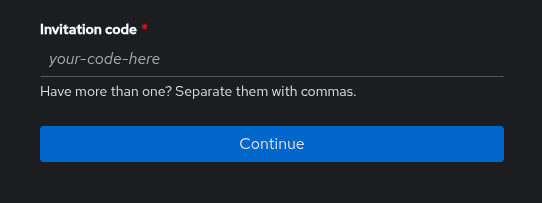
On successful authentication you will be able to confirm the roles you are trying to authenticate.
If these are the roles you expected, press the “Continue” button.
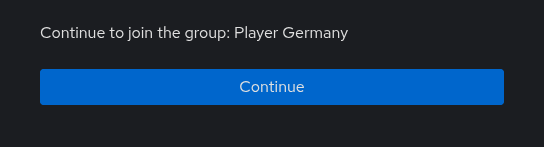
In case the token is invalid, please check for typos and check with your team’s Point of Contact. If needed, please contact the organizers.
Lastly you can change your username and set your password for your account, so you have a backup login mechanism.
We strongly recommend you add a email address, this way we can contact you directly in case of emergencies.
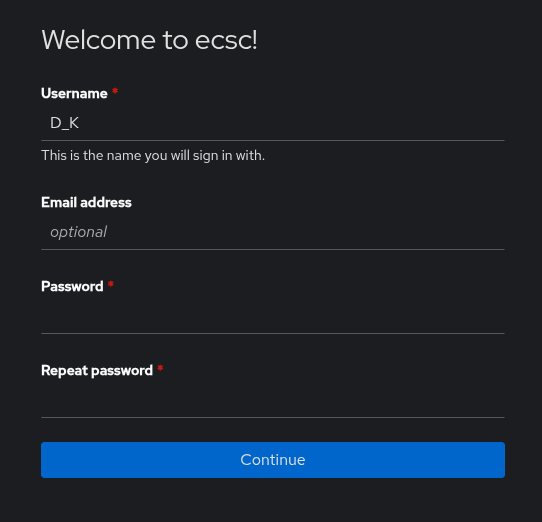
In the case something is not working, please re-try in a couple of minutes. In case of further problems, please contact the organizers.
You can change your password, email address at a later point in the user settings of Authentik. You can also redeem more tokens after registration.
The Jeopardy platform will serve as the central hub for all participants during the competition. It provides access to the challenges and displays the live scoreboard, allowing players to track their progress throughout the first day.
During the competition the Jeopardy platform will be available at: https://play.ecsc2026.de/
Teams are strongly encouraged to register and test their access on the platform during the Setup Time.
The following subsections describe various subpages of the Jeopardy Platform.
/tasksList of all available challenges, including selected information about the challenge, such as:
/challenge/<challenge_name>This page provides all details of the given challenge, including its description, current solve count and point value.
It also provides following functionality:
/scoreboardThis page shows current team rankings and lists solved challenges for each team.
Scoreboard by default shows only official teams, but has a feature to show all teams, i.e. official teams and guest teams.
Unlike in previous years, the scoreboard will not be frozen at the end of Day 1 this year. This said, please be mindful that the scoreboard might not be final and that submitting writeups for solved challenges is required.
/feedShows history of all challenge solves.
/sessionsShows your teams active challenge sessions.
You can terminate them here as well.
The ticketing system enables participants to submit support requests to the organizers. It may be used for filing formal complaints, reporting issues related to the stability or functionality of challenges and services, and addressing general or platform-related matters.
For all technical docs visit:
This section explains how to use the system from both the participants’ and the support staff’s perspectives.
The ticketing system is implemented using the “Discord-Tickets Bot”, which provides an efficient method for managing user requests during the competition, additionally we setup Zammad with a bridge, bridging both.
This section of the manual describes the usage of the Ticket Tool bot for participants of the competition, including players, captains, and coaches.
The interface of the ticketing system is provided in the form of a Discord channel #create-a-ticket.
Another way to create tickets is by using Zammad and writing a mail to <category>@ecsc2026.de.
The interface is visible to everyone.
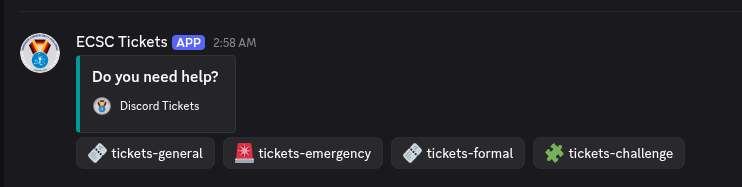
The ticket panel contains several buttons, each corresponding to a specific ticket category. The categories are briefly described below.
Tickets General category:
| Name | Description | Who can open ticket? | Who has access? |
|---|---|---|---|
| general | general questions, that may not fit any other category | everyone | Staff, Jury |
| formal | related to complaints, policies questions | ENISA, Jury, Steering Committee, Captain, Coaches | Staff, Jury |
| challenge | related to challenges | Player | Staff, Author, Jury |
| emergency | the type of a ticket related to “emergency” questions, in case of urgent emergencies, please first contact staff on site! | everyone | Staff, Jury |
| Press / Communications | Contact Comms about press visits, interviews, photo/video or press-angel support. | everyone | Staff, Press Room Managers ,Jury |
Emergencies category is for emergency tickets only.
The ticket lifecycle proceeds through the following stages:
The following guideline is the same for any type of tickets (emergency included).
The user should click the button for the type of a ticket that they want to create/open, e.g., “🧩tickets-challenge” button. On success a message form appears.
The message form helps the Staff to quickly figure out the problem without waiting for the first message.
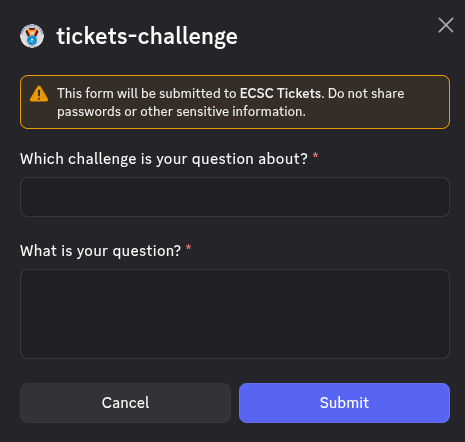
On success a success message appears
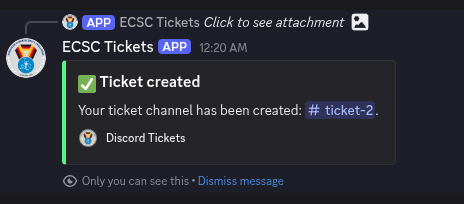
Newly created ticket - #ticket-2 in this case - is actually a Discord channel that the user will see in the 🧩 tickets-challenge category upon creation. This temporary ticket channel is only visible to the ticket owner which is the user in this case and the support team.
The ticket channel will contain a “Welcome message”. The user can write to the ticket as long as it’s open. The user should respond to any further questions
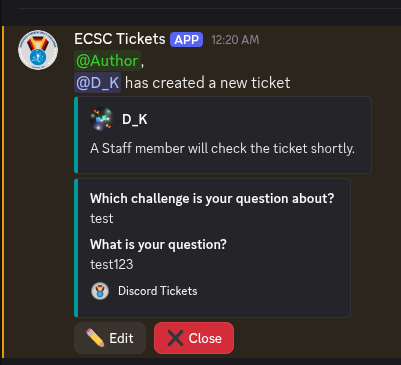
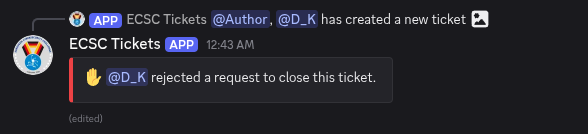
The user has an option to “Close” the ticket and so does the support team. The user might want to close the ticket in case its opening was not intentional (e.g. a misclick) or the issue was resolved. When the user or a support staff member clicks on the “Close” button, the other party has to confirm.
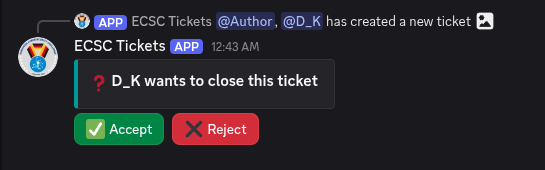
By clicking the green “Accept” button the ticket will be closed and the channel will be deleted and a transcript will be send to the user via private message obtainable via the “Transcript” button.
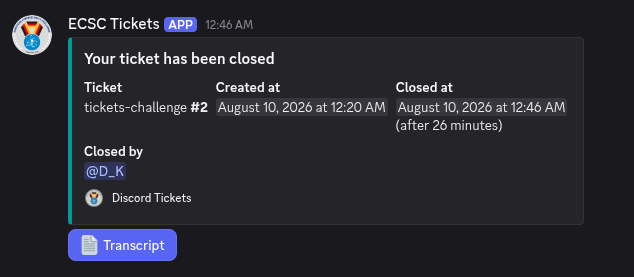
The user can also reject the ticket closing by clicking the “Reject” button. This means that the ticket stays open until the problem is resolved.
This section describes the organization of the ECSC2026 Discord Server categories and its channels. All channels are textual.
Notes:
Discord Admin role has read-write access to every channel. This role is limited to only few Staff members.The channels and categories are:
| Category | Channel Name | Write Access | Read Access |
|---|---|---|---|
| NONE | rules | Staff | everyone |
| NONE | create-a-ticket | everyone | |
| ECSC-Players | 📢-players-announcement | Staff | Jury, Player, Coach, Watchdog, ENISA, Author |
| ECSC-Players | <COUNTRY>-players | Staff, <COUNTRY>-player | Jury |
| Captains-Coaches | 📢-coaches-announcement | Staff, AD Staff | Jury, Coach, Captain, Watchdog, Author |
| Captains-Coaches | captains-coaches-comms | Staff, Coach, Captain, Watchdog, Author | Jury |
| Captains-Coaches | meeting-requests | Staff, Coach, Captain, Watchdog, Author | Jury |
| Steering-Committee | 📢-sc-announcement | Staff | Jury, Steering Committee |
| Steering-Committee | 🛞-general | Staff, Steering Committee | Jury |
| Watchdogs | 🐶-general | Staff, Watchdog | Jury |
| Angels | 😇-general | Staff, Angel | Jury |
| Jury | ⚖️-general | Staff, Jury | |
| Authors | 🧩-general | Staff, Author | |
| ECSC-Public | 📢-announcements | Staff | everyone |
| ECSC-Public | social-feeds | Staff | everyone |
| ECSC-Public | general | everyone | |
| ECSC-Public | memes | everyone | |
| ECSC-Public | random | everyone | |
| ECSC-Public | spam | everyone | |
| ECSC-Jeopardy | 📢-announcement-jeopardy | Staff | Jury, Author, Player, Watchdog |
| ECSC-Jeopardy | general-jeopardy | Staff, Author, Player, Watchdog | Jury |
| ECSC-AD | 📢-announcement-ad | Staff, AD Staff | Jury, Author, Player, Watchdog |
| ECSC-AD | general-ad | Staff, Author, Player, Watchdog | Jury |
This section is describing all important Discord roles that exist on ECSC2026 Discord Server.
Roles like: captain, coach, country, ticket-manager can be mapped to multiple role sets - they are sort of role “tags”. For more information, see Role sets section.
Please note that a Staff member might have multiple roles, including multiple extra case-specific roles if needed.
This part is explaining the role sets for the roles in the way they are organized on ECSC2026 Discord Server.
| Role set name | Discord roles |
|---|---|
| Captain | captain, player, player-country, country, captain-country |
| Coach | coach, coach-country, country |
| Player | player, player-country, country |
| Watchdog Manager | watchdog-manager, watchdog |
| Angel Manager | angel-manager, angel |
| Jeopardy Author | Jeopardy Author, Author |
| AD Staff | AD Staff, Author |